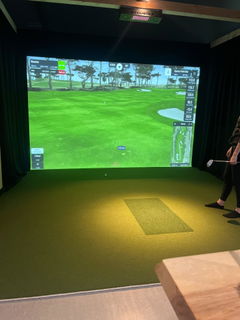
What's Included

Everything you need to build your home golf simulator, carefully selected into one complete package. The AccuGolf Sim-in-a-Box brings together Hawkeye launch monitor technology, immersive projection, gaming hardware, and essential simulator equipment.

AccuGolf Hawkeye

Dual high-speed camera launch monitor

  • Ceiling-mounted launch monitor
  • Advanced ball and club data tracking
  • No club or ball stickers required
  • Right- and left-handed compatibility
  • One swing camera included
  • AccuGolf Swing Vision software

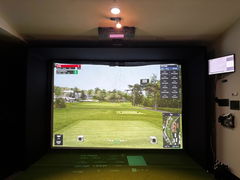
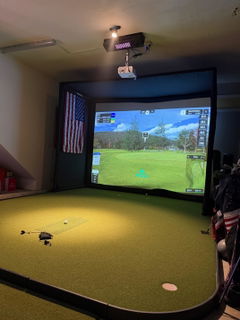
BenQ TH671ST Projector

Full HD 1080p short-throw projector

  • 1920 × 1080 Full HD resolution
  • Short-throw projection design
  • Designed for indoor golf simulation
  • Displays GSPro on the impact screen

Yeyian Gaming Desktop

Intel Core i5 + RTX 5050

  • Intel Core i5-14400F processor
  • NVIDIA GeForce RTX 5050
  • 16GB DDR5 RAM
  • 1TB NVMe SSD
  • Designed for GSPro simulation

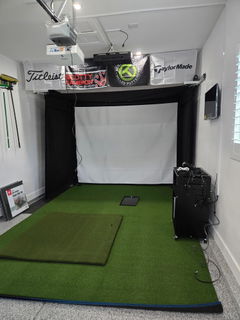
Carl's Place DIY Enclosure

8'H × 10.5'W

  • Golf impact screen included
  • DIY enclosure construction
  • Pipe framing kit included
  • Black enclosure surround
  • Designed for home simulator setups

Real Feel Golf Hitting Mat

5' × 5' hitting surface

  • Durable hitting mat construction
  • Comfortable stance and hitting area
  • Designed for repeated practice
  • Additional surrounding turf not included

GSPro + Swing Vision

Golf simulation and swing analysis

  • One-year GSPro license included
  • Access to GSPro's golf course library
  • One swing camera included
  • AccuGolf Swing Vision software
  • Record and review your golf swing

Why Choose Sim-in-a-Box?

A straightforward way to bring the Hawkeye experience home, without researching and purchasing each major simulator component separately.

One Complete Package

Get the launch monitor, gaming PC, projector, enclosure, hitting mat, and software together in one convenient package.

Hawkeye Performance

Experience dual high-speed camera tracking, detailed ball and club data, and sticker-free operation.

Designed for Home Golf

Enjoy indoor practice and golf simulation with a carefully selected set of essential simulator components.

Room to Upgrade

Start with the essentials and explore optional upgrades such as a second swing camera, floor data projection, and additional golf turf.

Important Package Information

  • Room dimensions, ceiling height, swing clearance, and projector throw distance must be verified before purchase. Enclosure dimensions do not represent the total room space required.
  • This package includes one main simulator projector and one swing camera. A second swing camera and the Floor Data Projection system are not included in Sim-in-a-Box.
  • The package includes a 5'×5' hitting mat. Additional surrounding artificial turf is not included.
  • The Carl's Place enclosure requires assembly. Professional installation, electrical work, ceiling modifications, and room renovations are not included unless separately agreed upon.
  • One year of GSPro is included. Continued access after the included term require a paid renewal.
  • Computer performance and simulator graphics settings may vary based on software requirements, resolution, and configuration.
  • Component models, specifications, and availability are subject to confirmation before fulfillment. Any proposed substitutions will be communicated before shipment.
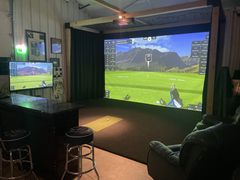
  • Product images may show decorative lighting, furniture, wall treatments, additional turf, displays, or other accessories not included in the package.
  • Shipping charges, applicable taxes, and optional installation services are calculated separately per case.

FAQs

What are the room requirements?

12ft'W x 9ft'H x 16ft'D

What are the PC requirements?
  • Intel i5 Processor
  • 16 GB Ram
  • Nvidia 4060 Graphics Card or equivalent
  • 512 GB of Solid State Drive
  • Windows 10 and Internet Connection (Required)
  • Must be able to connect a (Dual-Lan Port) card into your PC
  • (We DO NOT recommend using Nvidia 30 Series Graphics Cards)
  • ONLY COMPATIBLE WITH NVIDIA GPU’S
How do I setup?

We offer a comprehensive installation manual and tutorial that helps you install our systems with ease!
Installation Manual

How big is the hitting zone?

Our hitting zone spans 24in" W x 12in" L

Didn’t find your answer?